
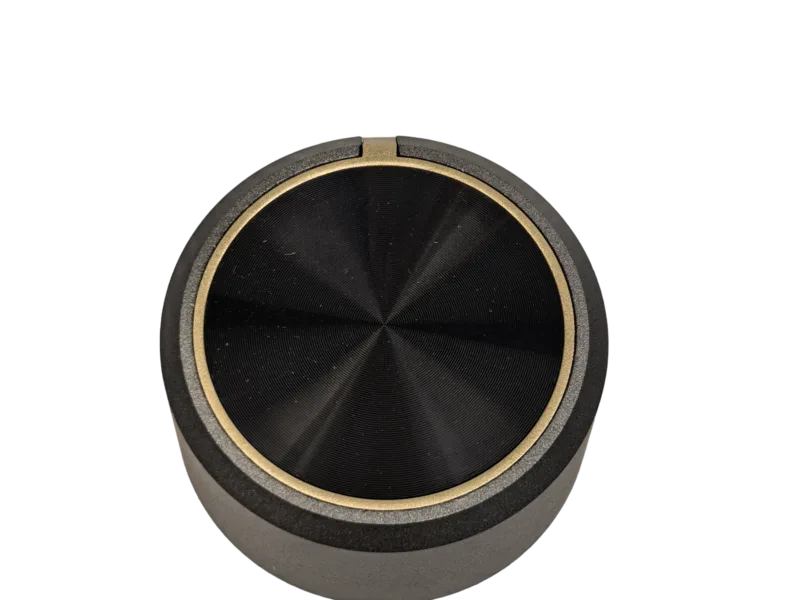
Oven control knobs affect fit, operation and front-panel appearance. For OEM and ODM projects, a specification needs more than a material name or front-view photo. It should define the shaft interface, dimensions, indicator orientation, visible finish and the information needed to assess an existing model or custom configuration.
This guide gives appliance buyers and engineers a practical checklist for built-in oven, mini oven and related cooker projects.
Quick answer: What specifications matter for oven control knobs?
Define the appliance control function, mating shaft, knob dimensions, panel clearance, rotation and OFF position, material, finish and markings. Put the mechanical drawing and panel artwork in the same review package so fit and visible design can be checked together.
What should an oven control knob specification include?
Start with the appliance control function. An oven may use separate controls for temperature, cooking mode, timer or other functions. Each control can have a different shaft profile, scale, rotation range or indicator requirement. Record the function before selecting a knob shape.
A complete oven control knob specification normally includes:
- Appliance type and control function
- Mating-shaft profile, critical dimensions and insertion depth
- Knob diameter, height and panel-clearance limits
- Rotation range, off position and indicator orientation
- Material, surface finish, colour and texture requirements
- Icons, temperature scale, logo, printing or marking requirements
- Drawing, reference sample and acceptance criteria
For existing application and model references, visit our oven control knobs for OEM projects.
1. Define the shaft interface and installed orientation
The shaft interface determines whether the knob can be assembled to the underlying control. State the shaft profile, critical dimensions, available shaft length and required insertion depth. Include the required off position and the direction of rotation, because the visible indicator must align with the oven control panel.
D-shafts are common reference points, but they are not the only profile. The project drawing should show the actual cross-section instead of relying on a generic profile name. For a detailed method, see how to specify an appliance knob shaft interface.
2. Set the knob diameter, height and panel clearance
Oven panels often include adjacent controls, a display, handle or door line. Define the knob diameter and overall height together with the spacing available around it. A reference knob may be useful for visual direction, but the final envelope must be checked against the panel drawing.
Include a front-panel drawing or marked photo showing:
- Centre-to-centre spacing between controls
- Clearance to adjacent displays, handles and trim
- The visible gap between the knob and the panel
- The required placement of the indicator relative to the scale
3. Choose material and finish with the design brief
Material and finish should be selected around the requested design, application and appearance requirement. GHKnob’s current product ranges include plastic appliance knobs, zinc alloy appliance knobs and aluminum appliance knobs. Use these as starting points when discussing a project, then confirm the final material and process against the actual drawing or sample.
In the RFQ, describe the requested surface appearance in plain, reviewable terms: colour, paint or plating direction where applicable, brushed or polished visual reference, texture, gloss level and any area that must remain unmarked. Attach approved colour and finish references where available.
4. Specify the indicator, icons and control scale
The indicator is part of the operating interface. Its position, geometry and contrast should be specified together with the oven panel artwork. State whether the knob carries a line, dot, pointer, symbol, temperature scale, mode icon or logo. Define which element is the visual reference when the control is in the off position.
If markings are printed or otherwise applied, send the artwork file and the relevant placement dimensions. A complete artwork package helps prevent a knob design from being reviewed only as an unmarked cosmetic sample.
5. Use existing models as references, not assumptions
An existing product model can help start a discussion about shape, material or dimensions. It is not a substitute for checking the shaft interface and panel layout. Review the model page for its published details, then provide the appliance drawing or mating sample before deciding it is suitable.
For example, the Model 63 ABS oven control knob is a reference for mini home appliance, mini oven and built-in oven applications. Other oven-related references are listed on the oven control knobs page.
6. Create an approval package before project terms are finalised
For a new oven control knob, keep the approved information in one review package. It should include the mechanical drawing, shaft interface details, panel artwork, material and finish direction, reference photos or sample information, and the acceptance points still open for confirmation.
This approach makes it easier to distinguish confirmed requirements from visual preferences or assumptions. It also gives purchasing, engineering and quality teams one common reference for the project discussion.
Oven control knob RFQ checklist
- Built-in oven, mini oven or related appliance application
- Temperature, mode, timer or other control function
- Shaft drawing, mating sample or measured photographs
- Knob dimensions and control-panel clearance requirements
- Off position, rotation direction and indicator alignment
- Material, finish, colour, texture and marking requirements
- Artwork for icons, scales, logos or printing
- Reference sample, target quantity, target schedule and acceptance criteria
Frequently asked questions
What is the most important oven control knob dimension?
There is no single dimension. The shaft interface, knob diameter, overall height, insertion depth and clearance to the oven panel all need to be reviewed together.
Can one knob design be used for both temperature and mode controls?
Only after the shaft interface, rotation range, indicator alignment and panel artwork have been checked for each control. Similar appearance does not confirm that the same configuration is suitable.
What artwork should be provided for oven knob markings?
Provide the final icons, temperature scale, logo or other marking artwork together with placement dimensions and the required OFF-position reference.
Need a starting point for an oven knob project?
Start by comparing the available oven control knob models and material options, then send your drawing, shaft information and appearance requirements through our contact page. The interface, dimensions and visible design can then be reviewed together for the intended appliance application.